|
|
|
|
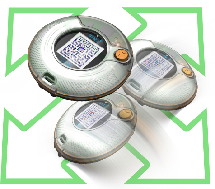
The Original STM32 Primer
|
|
The ergonomic design of the STM32 Primer1 with MEMS-based controls (navigate by tilting the tool left, right, backward or forward) and color LCD display provide fun and easy control of the demonstration firmware that includes graphical user interface and games based on the resources of the STM32 microcontroller. Originally delivered with two game applications (Maze and Breakout), the Primer1 now has dozens of sample applications available through the projects pages of stm32circle.com .
- Maze – A game where the player navigate inside a labyrinth, eating dots to win points while avoiding ghosts.
- Breakout – A game where the player uses a paddle to bounce a ball against a wall of blocks, destroying the block to win points. Win the game by destroying all the blocks.
Features of the STM32 Primer1 include:
- LCD color monitor (64K colors, 128x128 pixels)
- Two USB connectors:
-
One push button to switch on the power supply and to launch menu commands,
-
MEMS accelerometer for capture of the 3D-position information (implemented in navigation controls on the Primer1)
-
NIMH batteries for operation when not connected to a host PC
- Footprints on the printed circuit board for
- IrDA transceiver (top side, close to the "Debug USB port")
- Connector for some unused I/O pins
|
 |
|
|
|
|
|
|
|
Datasheets
|
|
You will find bellow the list of the main components used for the STM32-Primer1 and associated datasheets:
|
|
|
|
|









 STM32-Primer user manual
 STM32-Primer gerber